

21 Oct 2026 Santosh Agrawal
Introduction : At ZeaCloud, the private key behind our public TLS certificate is now never handled by a person. It is created, stored, delivered and replaced by automation running entirely on our own infrastructure in India.
That sounds like a small operational detail. It is not. A web certificate's private key is what proves a server is really ours; whoever holds a copy can impersonate us. Most teams protect the key well on the server and poorly everywhere else: in email, on laptops, in temporary folders and in chat. This post explains how we closed that gap, and what we learned doing it.
Like many operators, we began with a working but manual process. One server renewed a wildcard certificate from Let's Encrypt every 60 days. An engineer then copied the new certificate and key to every internal server that used it, one at a time.
Three things made this worse than it looked:
Every renewal produced a new private key, so each cycle meant moving a secret again, by hand, to several machines.
Our own security controls made copying harder. Administrative access needs a hardware security key, and servers cannot log in to each other. Every copy therefore passed through an engineer's workstation.
Manual steps leave traces. In one cycle, a copy of the key stayed in a temporary folder long after it was needed. Nothing was misused, but it showed us the process, not the people, was the risk.
It was also slow, and a missed server would only be noticed when its certificate expired and users saw an error.
We wrote down five principles before choosing any tool, and judged every design decision against them.
Security first. The private key and the DNS credential live only where they are needed. No person copies them, and every access is logged.
Automation ready. Renewal, delivery and service reload happen without anyone logging in.
Easy to maintain. Standard, packaged open-source components and one small script. Adding a server is a fixed, written procedure.
Proportionate. Build what today's estate needs, not a platform for demand that does not yet exist.
Sovereign. Keys, credentials, logs and automation stay on ZeaCloud infrastructure in India.
Three parts do all the work: an issuer that obtains certificates, a secrets vault that stores them, and an agent on each web server that collects them.
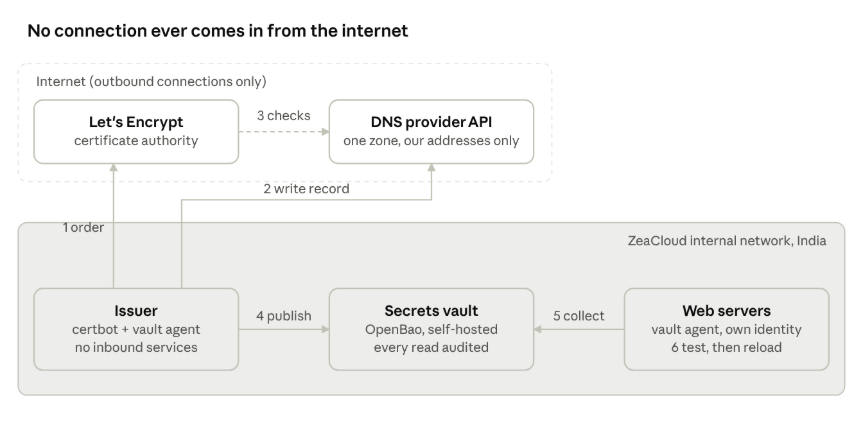
certificate flow· six steps, all connections outbound
Order. Twice a day, the issuer checks the certificate. With 30 days or less left, it asks Let's Encrypt for a new one.
Prove control. The issuer writes a short-lived validation record into our public DNS zone through the provider's API.
Validate. Let's Encrypt looks up that record in public DNS, then issues the certificate. The issuer removes the record.
Publish. The issuer checks the new key against the certificate and stores both in the vault, then reads the result back to confirm.
Collect. The agent on every web server checks the vault every few minutes. When the certificate has changed, it writes the new one to disk.
Reload. A file watcher sees the change, tests the web server's configuration and reloads it.
Renewal starts a month before expiry, and every server serves the new certificate within minutes. That month is our margin if any step ever fails.
DNS validation, so nothing listens to the internet. Let's Encrypt can check domain ownership by connecting to a web server, or by looking for a record in public DNS. We use DNS. The issuer therefore needs no open port at all: every connection it makes is outbound. It is also the only method that can issue a wildcard certificate.
A dedicated issuer that does one job. Certificate issuance runs on its own small virtual machine on an internal network, not on a shared web or identity server. It sits outside the DMZ on purpose: it receives no traffic from the internet, and it holds a key we keep out of internet-facing zones.
A DNS credential that can do almost nothing. The token that writes the validation record may edit DNS records in one zone only, and only when used from our issuer's own outbound addresses. A stolen copy is useless anywhere else.
Secrets in a vault, not in files. The DNS token and the certificate live in our self-hosted secrets vault. The vault's agent on each server collects what that server needs. The token was entered once, straight into the vault, with hidden input; it has never been in a file, an email or a chat.
One identity per server, tied to its address. Each server has its own machine credential, which works only from that server's address and may read only the certificate. If one server is retired or suspected compromised, we revoke it alone, and the vault's audit log names the server behind every read of the key. Engineers' own vault accounts cannot read these secrets at all.
Credentials delivered sealed. A server's credential is handed over inside a single-use wrapper that expires in minutes. The server opens it itself, so the credential is never displayed. If anyone else had opened it first, the server's attempt would fail and we would know.
Certificate and key change together. The agent writes the certificate and its key as one file, replaced in a single step. A web server can never load a new certificate with an old key.
Test before reload. The web server reloads only after its configuration test passes. If a change ever broke it, the server keeps serving the previous certificate from memory.
Check before publishing. Before anything reaches the vault, the issuer confirms the private key matches the certificate, then reads the fingerprint back to confirm the write.
Permission names can mislead. Our DNS provider's token editor offers "DNS Settings" permissions and a plain "DNS" permission. Only the plain one can create records. The settings permissions control things such as DNSSEC, which this token should never touch. Read the final summary of any token before you create it.
Don't deliver certificates through the thing that needs them. Our vault has a web front end that uses the same wildcard. If servers fetched certificates through it, an expired certificate would block delivery of its own replacement. Our agents talk to the vault's own listener, which has a separate certificate.
Validate. We run every agent as an unprivileged user with its home directories hidden. The agent then failed at start-up, because its command-line tool looks for a settings file in the home directory. Pointing its home at its own data directory fixed it without loosening anything.
Package managers can restart services you didn't touch. On one release, installing a single package automatically restarted the web server and the database. For the remaining servers, especially the one engineers use for remote access, we switched restarts to "list only".
Prove the trigger, not just the reload. Reloading the web server by hand proves little. We deleted the rendered certificate and let the agent write it again, and confirmed the file watcher reloaded the web server by itself. That is the path a real renewal will take.
Separate the pattern from the instance. The design fits on one page. The specifics (names, addresses, paths, roles) live in our internal documentation and version control, and nowhere else.
Every component runs on ZeaCloud infrastructure in India: the issuer, the secrets vault, the agents and the logs. The building blocks are open source: certbot for issuance and OpenBao, the community-governed open-source secrets vault, for storage and delivery. No external control plane can read our keys, and no licence change can switch the system off.
The system depends on exactly two outside services, both outbound only. One is Let's Encrypt, the non-profit certificate authority that browsers trust. The other is the API of the DNS provider that hosts our public zone. Both are unavoidable for a publicly trusted certificate. Neither ever sees a private key: the certificate authority sees only a signing request, and the DNS provider sees only a short-lived validation record.
Certificate renewal used to be a recurring task with a deadline. It is now a background process we monitor: an alert fires weeks before any certificate on any server could expire, so a stalled step is caught long before a customer would notice.
The same pattern extends to any further public certificate with one command and one access rule. For internal-only services, our next step is a private certificate authority anchored in hardware security modules in our own data centres. That will give every internal service its own certificate without publishing its name in public certificate logs.
If you run infrastructure in India and are working through the same problem, we would be glad to compare notes.